SMS OTP Consent and Verification Flow
Overview
Our website uses SMS exclusively for phone number verification. Users are required to explicitly consent to receiving an SMS verification code before the verification code is sent.
We do not use this SMS channel for marketing, promotional, or advertising messages.
SMS Opt-In Flow
Step 1: Mobile Number and SMS Consent
The user enters their mobile number on the verification screen.
The SMS consent checkbox is initially unchecked, and the Send Verification Code button remains disabled.
SMS Consent Text:
“I agree to receive an SMS verification code from Karville to verify my phone number.”
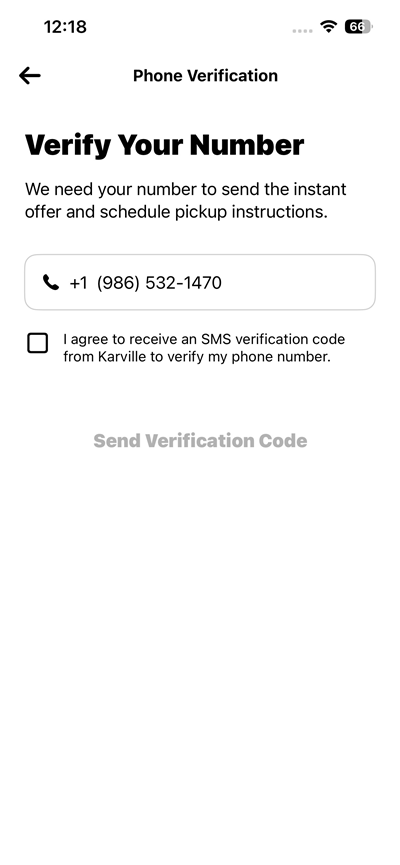
Screenshot 1: Mobile number entered with SMS consent unchecked and the Send Verification Code button disabled.
Step 2: User Provides SMS Consent
The user explicitly selects the SMS consent checkbox.
Once consent is provided, the Send Verification Code button becomes enabled, allowing the user to request the SMS verification code.
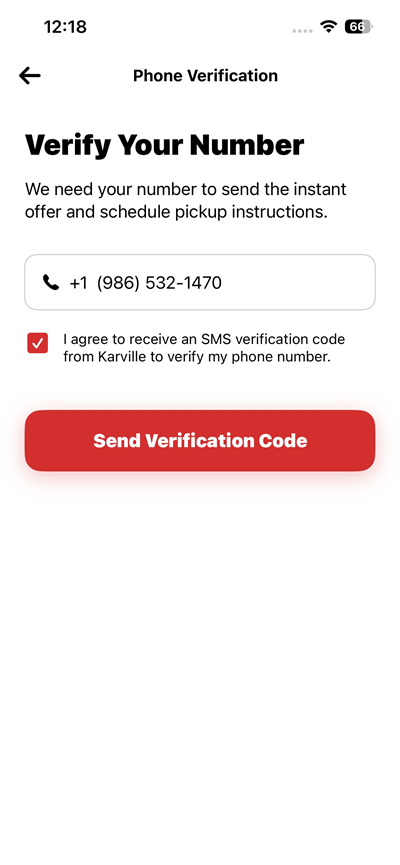
Screenshot 2: SMS consent checkbox selected and the Send Verification Code button enabled.
Step 3: OTP Verification
After the user requests the verification code, an SMS containing the verification code is sent to the provided mobile number.
The user is then presented with the OTP verification screen and enters the received verification code to complete phone number verification.
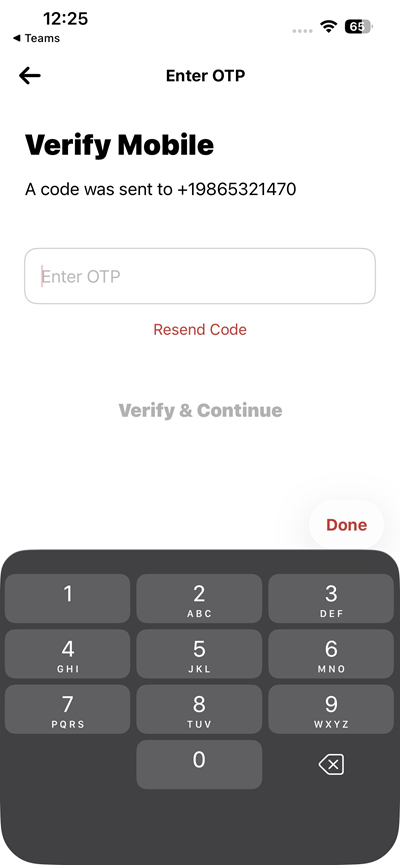
Screenshot 3: OTP verification screen with empty verification code input boxes.
SMS Usage
The SMS messages sent through this flow are used exclusively for:
• Phone number verification
• One-time password (OTP) authentication
No promotional or marketing SMS messages are sent through this SMS program.
User Consent
The SMS consent is explicitly requested from the user before the verification code is sent. The user must select the SMS consent checkbox to enable the Send Verification Code button and proceed with SMS verification.